

Download Virtual Teleprompter (Online Meetings) – Online Meetings, Teleprompter, Presentation Tool, Productivity, Utility
Overview
Virtual Teleprompter (Online Meetings) is a specialized mobile application designed to support professionals in delivering confident, polished presentations during virtual meetings and live-streamed events. The app addresses the common challenge of maintaining eye contact with an audience while reading from a script, a critical factor in effective communication. By enabling real-time control over text display, it helps users stay focused, articulate, and composed—especially valuable in high-stakes scenarios such as interviews, webinars, and client pitches.
Target users include remote workers, content creators, educators, and business professionals who rely on consistent, professional delivery during digital presentations. The app’s core purpose is to bridge the gap between prepared content and natural delivery, ensuring messages are communicated clearly and with authority. While the developer’s background is not publicly detailed, the app’s functionality suggests a focus on usability and performance for productivity-driven users.
Real-world use cases include preparing for online interviews, managing scripted segments during live streams, or rehearsing presentations before team meetings. In today’s remote-first work environment, tools that enhance clarity and presence are increasingly vital. Virtual Teleprompter (Online Meetings) contributes meaningfully to the digital communication ecosystem by offering a lightweight, reliable solution for those seeking to improve their on-camera performance without complex setups.
Key Features & Functionality
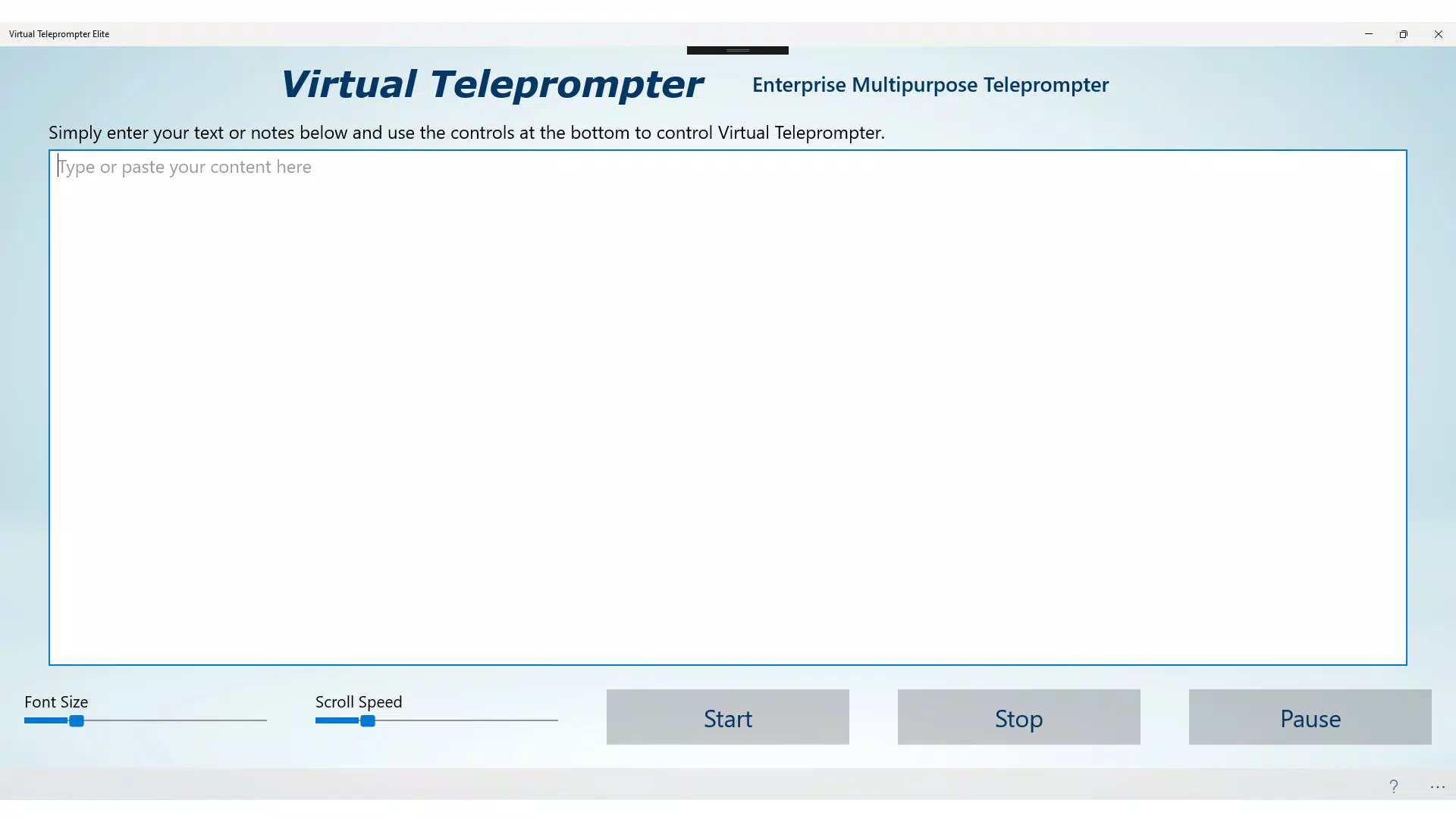
- Flexible Text Input: The app allows users to enter and edit their speech or notes directly within an intuitive text editor. This enables dynamic preparation and last-minute adjustments, ensuring content remains relevant and on-topic during live delivery.
- Complete Control Over Playback: Users can start, pause, or stop the teleprompter at any moment. This real-time adjustability is especially useful during Q&A sessions or when adapting to audience reactions, maintaining a natural flow of conversation.
- Customizable Display Settings: Real-time adjustments to font size and scrolling speed accommodate individual speaking rhythms and reading comfort. This personalization enhances readability and reduces the risk of losing one’s place during high-pressure moments.
- Seamless Integration with Major Platforms: Designed to work with Zoom, Microsoft Teams, and Google Meet, the app supports a wide range of virtual meeting environments. This compatibility ensures consistent performance across different digital workspaces.
- Offline Operation: The application runs entirely offline, minimizing reliance on internet connectivity and reducing strain on system resources. This makes it ideal for environments with unstable connections or for users seeking privacy and reduced bandwidth usage.
For example, a presenter preparing for a client webinar can input their script, adjust the scrolling speed to match their natural pace, and begin the session with full control—without needing to switch between devices or applications. Similarly, a content creator hosting a live stream can pause the teleprompter mid-sentence to respond to viewer comments, ensuring both spontaneity and preparedness.
Interface, UX & Performance
The user interface of Virtual Teleprompter (Online Meetings) is designed with clarity and simplicity in mind. The layout centers around a clean, distraction-free text display area, optimized for visibility during camera-facing presentations. Visual elements are minimal, ensuring the focus remains on the script and not on UI clutter.
Navigational flow is straightforward: users input their text, adjust settings, and initiate playback with minimal steps. The app’s responsiveness is consistent across various device categories, although specific performance benchmarks were not provided by the developer. Although the developer did not list formal performance metrics, the app’s offline functionality and low resource consumption suggest efficient operation even on mid-tier devices.
Stability appears to be a priority, as the application maintains consistent performance during extended use. The ability to pause and resume without glitches supports smooth transitions in live settings. While detailed information on battery usage or memory footprint was not disclosed, the app’s design implies a lightweight footprint suitable for long meetings and repeated use.
Platform Compatibility & Technical Requirements
Virtual Teleprompter (Online Meetings) is available on the Android platform. The app is compatible with Android operating systems, though specific minimum OS versions were not listed. The file size is 18.5 MB, making it a lightweight download suitable for devices with limited storage space.
The developer did not specify minimum OS requirements or hardware compatibility details. As such, users should ensure their device meets general Android standards for running productivity applications. Compatibility with specific devices or screen sizes was not fully disclosed, but the app’s interface appears to adapt well to standard smartphone and tablet displays.
Pros and Cons
Pros
- Intuitive, distraction-free interface ideal for on-camera delivery
- Real-time control over playback with start, pause, and stop functions
- Customizable font size and scrolling speed for personalized reading comfort
- Operates offline, preserving bandwidth and enhancing privacy
- Compatible with major video conferencing platforms like Zoom, Teams, and Google Meet
Cons
- Specific OS version requirements were not disclosed
- Developer did not provide detailed performance or system usage data
- Compatibility with specific device models or screen sizes was not confirmed
- Limited information on battery impact during extended use
- No built-in cloud sync or backup for scripts across devices
FAQ
Is Virtual Teleprompter (Online Meetings) safe to download and use?
The app is designed to operate securely on Android devices. It runs offline and does not collect personal data, making it a low-risk tool for users concerned about privacy.
Can I use this app on iOS devices?
The developer has not confirmed iOS availability. Currently, the app is only available for Android.
Does the app require an internet connection?
No, Virtual Teleprompter (Online Meetings) operates entirely offline. This ensures uninterrupted performance during meetings, even in low-connectivity environments.
How do I update the app?
Updates are typically delivered through the Google Play Store. Users should ensure their device is connected to the internet to receive the latest version.
Is there a free version available?
While pricing details were not disclosed, the app may be available as a free download with optional in-app features. Users should check the Play Store listing for current pricing and availability.
Final Thoughts + CTA
Virtual Teleprompter (Online Meetings) delivers a focused, reliable solution for professionals aiming to enhance their on-camera presence during digital presentations. Its clean interface, real-time control, and offline functionality make it a valuable addition to any remote communicator’s toolkit. Whether you're hosting a webinar, delivering a pitch, or conducting an interview, the app ensures your message is delivered with clarity and confidence.
While some technical details remain unspecified, the app’s core functionality is well-executed and tailored to real-world needs. Its compatibility with major platforms and minimal system impact further solidify its position as a practical utility for productivity-focused users.
For anyone seeking to improve their virtual communication skills, this app offers a simple yet powerful way to stay on script without losing eye contact. Download Virtual Teleprompter (Online Meetings) now


